
● UPDATED FOR 2026
GST Registration in India: the easy 8-step guide that helps you avoid fines
GST Registration in India is the first legal step for any shop, freelancer, or online seller who crosses the turnover limit. This guide walks you through every screen on the GST portal, in the same order a real officer expects to see it.
- ₹0 Government Fee
- 8 Simple Steps
- 7 Working Days
- 15 Digit GSTIN
- 100% Online Process
Basics
What is GST Registration in India?
Understanding India's unified tax system and why registration is your first step to legal compliance.
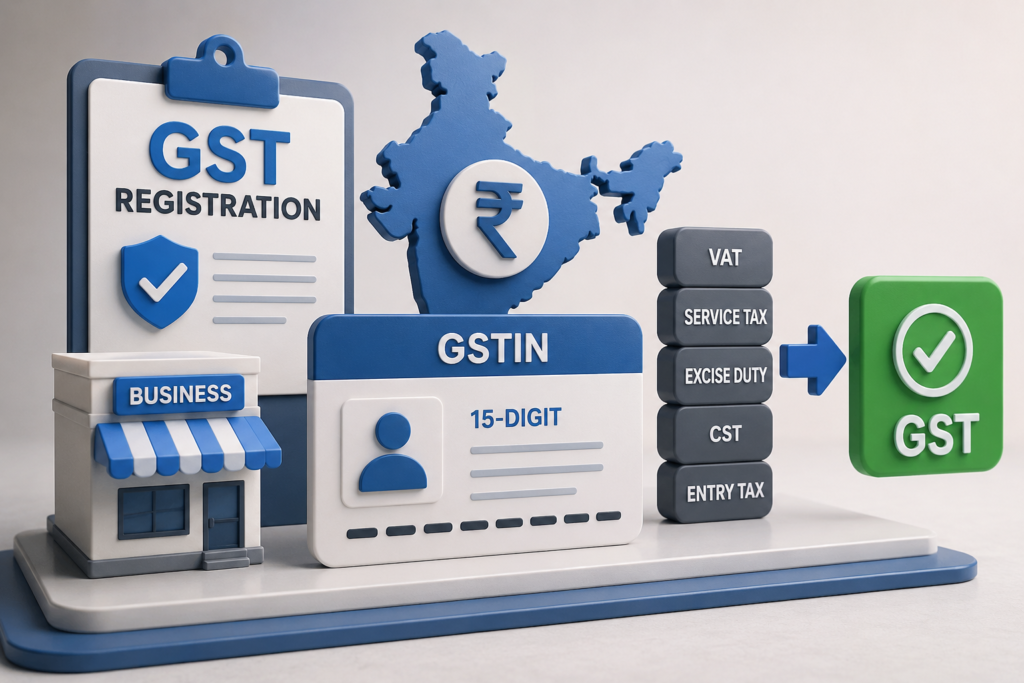
GST Registration in India is the process of enrolling your business under the Goods and Services Tax system — India's single, unified indirect tax that replaced VAT, Service Tax, Excise Duty, CST, and Entry Tax.
After completing GST Registration, your business receives a unique 15-digit GSTIN number — your legal tax identity. Without it, you cannot legally collect GST from customers, issue proper tax invoices, or claim Input Tax Credit (ITC).
The best part? GST Registration in India is completely free — ₹0 government fee — and the entire process is done online through the official GST portal at gst.gov.in.
- VAT
- Service Tax
- Excise Duty
- CST
- Entry Tax
- ✅ GST
Eligibility
Who Must Apply for
GST Registration in India?
You are legally required to register under GST if any of the
following apply to your business.
following apply to your business.
Goods Sellers
If your annual turnover from selling goods exceeds the threshold limit, GST Registration is mandatory.
Service Providers
Professionals, consultants, freelancers, and agencies providing services must register once they cross the limit.
Inter-State Sellers
Selling goods or services across state borders? GST Registration is compulsory regardless of turnover amount.
E-Commerce Sellers
Selling on Amazon, Flipkart, Meesho, or any e-commerce marketplace requires mandatory GST Registration.
Step-by-Step Process
How to Complete GST Registration
in India Online — 8 Steps
The complete process on gst.gov.in — with real examples from
Ravi's Textile business in Hyderabad.
Ravi's Textile business in Hyderabad.
Step 1 — Visit the GST Portal to Begin Registration
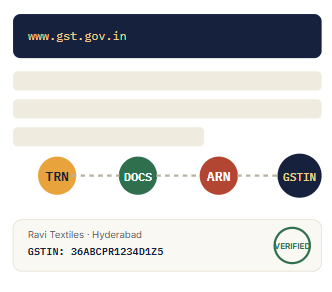
Go to www.gst.gov.in. Click on "Services" → "Registration" → "New Registration" to begin the GST Registration process in India.
💡 Ravi's textile shop in Hyderabad opens the portal to begin his GST Registration in India.
Step 2 —Fill Part-A: Basic Information
Select your taxpayer type (Regular or Composition). Enter your PAN, email address, and mobile number. Verify both using OTP received on each.
💡Ravi enters PAN: ABCPR1234D, email & mobile → verifies both OTPs to proceed with GST Registration.
Step 3 — Receive Your TRN (Temporary Reference Number)
After Part-A verification, you receive a 15-digit TRN via email and SMS. This is valid for 15 days — use it to complete Part-B of your GST Registration application.
💡Ravi's TRN: 36221118514042T — valid for 15 days to complete GST Registration.
Step 4 — Fill Part-B: Business Details
Login with your TRN. Fill in business name, address, nature of business, HSN/SAC codes for your products or services, and your bank account details.
💡Ravi fills "Ravi Textiles", Hyderabad address, selects "Retail Trade" in his GST Registration form.
Step 5 — Upload Required Documents
Upload your PAN, Aadhaar, address proof (electricity bill or rent agreement), bank proof (cancelled cheque), proprietor photograph, and partnership deed if applicable.
💡Ravi uploads electricity bill + cancelled cheque for his GST Registration in India application.
Step 6 — Verify and Submit Your GST Registration Application
Sign using DSC (Digital Signature Certificate) for companies/LLPs, or EVC (OTP via Aadhaar-linked mobile) for individuals and proprietors.
💡Ravi uses EVC — OTP sent to his Aadhaar-linked mobile to submit his GST Registration.
Step 7 — Receive ARN (Application Reference Number)
Post submission, you receive an ARN to track your application status on the portal under "Track Application Status." Status shows "Pending with Tax Officer."
💡 Example: Ravi's ARN: AA361018514042R — checks status after 3 days
Step 8 — Receive Your GSTIN Certificate — GST Registration Complete!
Within 7 working days, a GST officer verifies your application. You receive your 15-digit GSTIN — your official tax identity number for doing business across India.
💡 Ravi's GSTIN: 36ABCPR1234D1Z5 (36 = Telangana state code) — GST Registration done!
Documents Required
Documents Needed for GST Registration in India
Keep these 6 documents ready to avoid delays or rejection of
your GST Registration application.
PAN Card
Owner's / Business PAN number is mandatory
Aadhaar Card
Proprietor's Aadhaar for identity & OTP verification
Address Proof
Electricity bill or rent / lease agreement
Bank Account Proof
Cancelled cheque or latest bank passbook
Proprietor Photo
Recent passport-size photograph
Partnership Deed
Required if the business is a partnership firm
GSTIN Explained
How Your GSTIN Number Works After GST Registration
After successful GST Registration in India, you receive a unique
15-character GSTIN. Here's what each part means.
Your GSTIN Format — 36ABCPR1234D1Z5
36 = State Code (Telangana)
ABCPR1234D = PAN Number (10 digits)
1 = Entity Number
Z = Default Character
5 = Check Digit
Why Register?
6 Key Benefits of GST Registration in India
GST Registration in India is not just a legal requirement —
it's a powerful business growth tool.
it's a powerful business growth tool.
Input Tax Credit (ITC)
Claim back the GST you paid on your purchases and reduce your overall tax burden — saving real money every month.
Legal Authorization
Legally collect GST from your customers and issue proper tax invoices — making your business fully compliant.
Pan-India Business
Expand and sell your products or services across all states in India without any restrictions.
Build Customer Trust
Businesses with GSTIN are seen as credible and professional — increasing client confidence and closing more deals.
Government Tenders
Become eligible to bid for and win lucrative government tenders — a door that opens only after GST Registration.
Sell on E-Commerce
List your products on Amazon, Flipkart, Meesho, and other platforms — GSTIN is a mandatory requirement for all sellers.
What if you skip GST Registration?
Penalty is 10% of the tax due, or a minimum of ₹10,000 — and 100% of the tax due in proven fraud cases.
Avoid These
Mistakes That Cause GST Registration Rejection
Avoid these common errors to get your GST Registration in India approved without delays.
Entering wrong business details on Part-A or Part-B
Uploading incorrect or mismatched documents
Forgetting to update changed bank account details
Delaying GSTR-1 and GSTR-3B return filing
After GST Registration in India: What Comes Next
Avoid these common errors to get your GST Registration in India approved without delays.
Quick Answers
GST Registration in India — Frequently Asked Questions
Yes. GST Registration carries no government fee, and the entire process happens online through the official GST portal.
Once a tax officer verifies your application, approval typically takes about 7 working days, after which your GSTIN is issued.
You must file GST returns (GSTR-1, GSTR-3B) monthly or quarterly, maintain proper invoices, and keep records ready for audit.
Yes, you can correct the flagged details or documents and submit a fresh application through the same portal.
Once approved, your certificate is available for download anytime from your account on the GST portal.
Ready to complete your GST Registration?
Keep your PAN, Aadhaar, and bank details ready — the whole process takes about 20 minutes to submit.